
SQL Query Node#
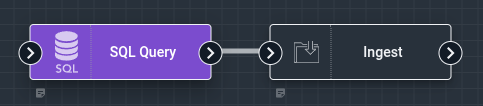
The SQL Query node executes SQL SELECT queries against external databases and makes the results available to the flow. It supports MySQL, PostgreSQL, Microsoft SQL Server, and Oracle databases.
Configuration#
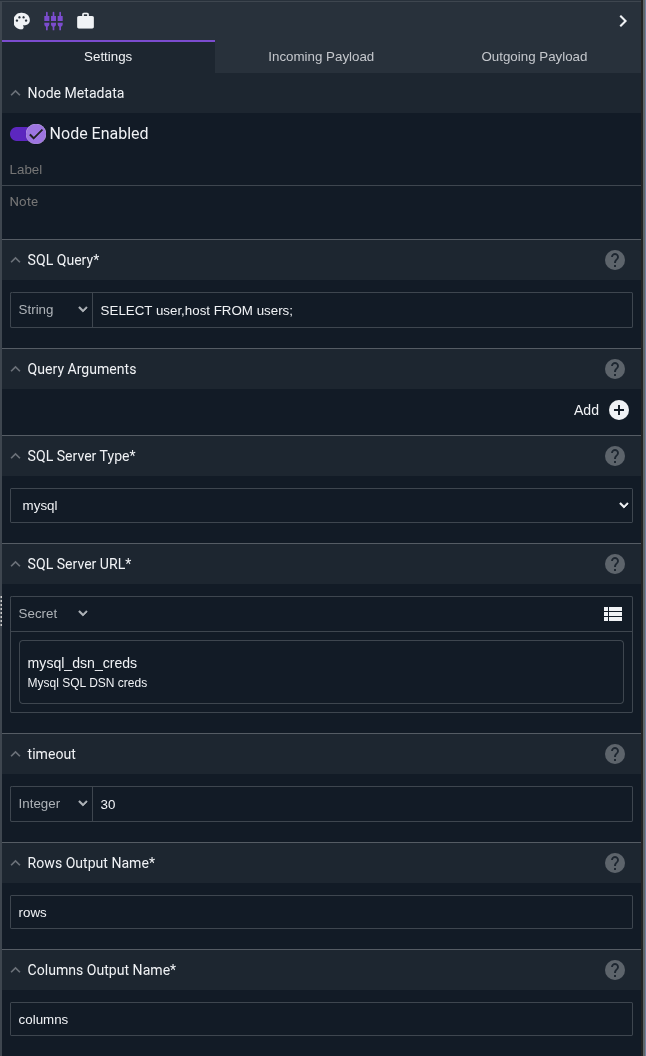
Query, required: the SQL SELECT query to execute. Can include placeholders (?) for parameterized queries.Arguments: an optional array of arguments to use with parameterized queries. Each placeholder in the query will be replaced with the corresponding argument value.Driver Name, required: the SQL driver to use. Must be one of:mysql- MySQL/MariaDB databasespostgres- PostgreSQL databasessqlserver- Microsoft SQL Server databasesoracle- Oracle databases
Data Source Name, required: the connection string for the database. This should typically be stored as a secret. The format varies by driver (see below).Timeout: the query timeout in seconds (default: 30). Must be greater than zero.Rows Output: the name of the payload variable that will receive the query results (default: “rows”).Columns Output: the name of the payload variable that will receive the column names (default: “columns”).
Data Source Name Formats#
The SQL Query node uses Go’s sql.Open function to establish database connections. The Data Source Name (DSN) format varies by driver and follows the conventions of each underlying Go database driver.
Note
Data source names contain sensitive credentials and should always be stored as secrets in Gravwell rather than hardcoded in the flow configuration.
MySQL#
Driver: github.com/go-sql-driver/mysql
Basic Format:
username:password@tcp(hostname:port)/database
Examples:
Connect to local MySQL database:
dbuser:secretpass@tcp(localhost:3306)/userdb
Connect to remote MySQL server with explicit options:
appuser:mypassword@tcp(mysql.company.com:3306)/production?charset=utf8mb4&parseTime=True&loc=Local
Connect via Unix socket:
root:password@unix(/var/run/mysqld/mysqld.sock)/mysql
Common Options:
charset=utf8mb4- Character set for the connectionparseTime=True- Parse DATE and DATETIME to Go time.Timetimeout=30s- Connection timeoutreadTimeout=30s- I/O read timeoutwriteTimeout=30s- I/O write timeout
Full documentation: go-sql-driver/mysql
PostgreSQL#
Driver: github.com/lib/pq
Basic Format (URL):
postgres://username:password@hostname:port/database?options
Basic Format (Connection String):
host=hostname port=5432 user=username password=password dbname=database sslmode=disable
Examples:
Connect to PostgreSQL with SSL disabled (local development):
postgres://postgres:mypassword@localhost:5432/analytics?sslmode=disable
Connect to PostgreSQL with SSL required (production):
postgres://pguser:securepass@db.company.com:5432/proddb?sslmode=require
Connect using connection string format:
host=postgres.company.com port=5432 user=analyst password=pass123 dbname=warehouse sslmode=verify-full
Connect with connection timeout:
postgres://dbuser:password@db.company.com:5432/mydb?sslmode=require&connect_timeout=10
Common Options:
sslmode=disable- No SSL (local only)sslmode=require- Require SSL but don’t verify certificatesslmode=verify-full- Require SSL and verify certificateconnect_timeout=10- Connection timeout in secondsapplication_name=gravwell- Set application name in PostgreSQL logs
Full documentation: lib/pq
SQL Server#
Driver: github.com/denisenkom/go-mssqldb
Basic Format:
sqlserver://username:password@hostname:port?database=dbname
Examples:
Connect to SQL Server with database name:
sqlserver://sa:YourStrong!Passw0rd@sqlserver.company.com:1433?database=UserDB
Connect with Windows authentication (integrated security):
sqlserver://DOMAIN\username:password@sqlserver.local:1433?database=Analytics
Connect with encryption and trust server certificate:
sqlserver://appuser:pass123@mssql.company.com:1433?database=Production&encrypt=true&TrustServerCertificate=true
Connect with additional options:
sqlserver://dbuser:password@sql01.company.com:1433?database=Logs&connection+timeout=30&app+name=Gravwell
Common Options:
database=name- Database nameencrypt=true- Enable encryptionTrustServerCertificate=true- Trust server certificate without validationconnection+timeout=30- Connection timeout in secondsapp+name=Gravwell- Application name
Full documentation: go-mssqldb
Oracle#
Driver: github.com/sijms/go-ora
Basic Format:
oracle://username:password@hostname:port/servicename
Examples:
Connect to Oracle database with service name:
oracle://system:oracle@oracle.company.com:1521/ORCL
Connect to Oracle with SID instead of service name:
oracle://appuser:password@oracledb.local:1521/PROD?sid=PRODDB
Connect with wallet for secure authentication:
oracle://dbuser:pass@oracle-prod.company.com:1521/PRODSERV?SSL=true&SSL+Verify=false
Connect with advanced options:
oracle://analytics:password@oracle.company.com:1521/ANALYTICS?TIMEOUT=30&PREFETCH_ROWS=1000
Common Options:
sid=DBSID- Use SID instead of service nameSSL=true- Enable SSL/TLSSSL+Verify=false- Skip SSL certificate verificationTIMEOUT=30- Connection timeout in secondsPREFETCH_ROWS=1000- Number of rows to prefetch
Full documentation: go-ora
Storing DSN as Secrets#
To store a Data Source Name as a secret in Gravwell:
Navigate to Main Menu → Secrets
Click Add Secret
Enter a name like
mysql_userdb_dsnorpostgres_analytics_dsnPaste the complete connection string as the secret value
Click Save
In the SQL Query node configuration, reference the secret using the format:
secret:mysql_userdb_dsn
This keeps credentials secure and allows you to update connection strings without modifying flows.
Output#
The node sets two variables in the payload:
rows(or the name specified in Rows Output): a two-dimensional array containing the query results. Each element is a row, and each row is an array of column values.columns(or the name specified in Columns Output): an array of strings containing the column names returned by the query.
The node does not modify other payload values.
Parameterized Queries#
For security and proper data handling, use parameterized queries rather than string concatenation. The SQL Query node uses Go’s database/sql package, which provides protection against SQL injection when using parameterized queries.
Why Use Parameterized Queries?#
Parameterized queries (also called prepared statements) offer several benefits:
Security: Protection against SQL injection attacks
Correctness: Automatic escaping of special characters
Type safety: Proper handling of different data types
Performance: Some databases can cache query plans
Placeholder Syntax by Driver#
Different database drivers use different placeholder syntax. The SQL Query node supports the following:
MySQL#
MySQL uses ? as a positional placeholder:
SELECT username, last_login, failed_attempts
FROM user_accounts
WHERE username = ? AND hostname = ?
Arguments: jsmith, webserver01.company.com
The first ? is replaced with the first argument, the second ? with the second argument, and so on.
PostgreSQL#
PostgreSQL uses $1, $2, $3, etc. as numbered placeholders:
SELECT username, email, last_login
FROM user_accounts
WHERE username = $1 AND last_login > $2
Arguments: jdoe, 2024-01-01T00:00:00Z
You can reuse the same placeholder number:
SELECT src_host, dst_host, connection_count
FROM network_logs
WHERE src_host = $1 OR dst_host = $1
Arguments: database.company.com
SQL Server#
SQL Server uses @p1, @p2, @p3, etc. as numbered placeholders:
SELECT username, department, login_time
FROM active_sessions
WHERE hostname = @p1 AND username = @p2
Arguments: workstation42, asmith
Oracle#
Oracle uses :1, :2, :3, etc. as numbered placeholders:
SELECT username, role, last_access
FROM user_permissions
WHERE username = :1 AND hostname = :2
Arguments: dbadmin, proddb01.company.com
Example: Bad vs. Good#
Bad (string concatenation - NEVER DO THIS):
SELECT * FROM user_accounts WHERE username = 'jsmith' AND hostname = 'server01'
This is vulnerable to SQL injection if the values come from user input or untrusted sources. An attacker could input '; DROP TABLE user_accounts; -- as a username.
Good (parameterized with MySQL):
SELECT * FROM user_accounts WHERE username = ? AND hostname = ?
Arguments: jsmith1, server01`
Good (parameterized with PostgreSQL):
SELECT * FROM user_accounts WHERE username = $1 AND hostname = $2
Arguments: jsmith, server01
Using Arrays as Arguments#
In the flow editor, the Arguments field accepts an array of values. You can construct this array in several ways:
Hardcoded array:
["jsmith", "webserver01"]From payload variables: If you have variables
usernameandhostin the payload, reference them in the arrayMixed:
["hardcoded_value", someVariable, 42]
Complex Example: User Activity Query#
PostgreSQL query checking user login activity across multiple hosts:
SELECT u.username, u.hostname, u.login_time, u.session_duration, h.ip_address
FROM user_sessions u
JOIN host_info h ON u.hostname = h.hostname
WHERE u.username = $1
  AND u.login_time > $2
  AND u.failed_attempts < $3
  AND h.hostname IN ($4, $5, $6)
ORDER BY u.login_time DESC
LIMIT $7
Arguments: jsmith, 2024-01-01T00:00:00Z, 5, web01.company.com, web02.company.com, web03.company.com, 100
This query finds recent login sessions for user “jsmith” from specific web servers, filtering out accounts with too many failed attempts.
Example: Host-Based Access Control Audit#
MySQL query to find which users have accessed specific systems:
SELECT username, hostname, access_time, access_type, resource_accessed
FROM access_logs
WHERE hostname = ?
  AND access_time BETWEEN ? AND ?
  AND access_type IN ('ssh', 'rdp', 'console')
ORDER BY access_time DESC
Arguments: proddb01.company.com, 2024-03-01 00:00:00, 2024-03-11 23:59:59
This retrieves all interactive login attempts to a production database server during a specific time range.
Warning
Never build SQL queries using string concatenation or interpolation with untrusted input. Always use parameterized queries to prevent SQL injection attacks.
Query Timeout and Connection#
The node performs the following steps:
Opens a connection to the database
Pings the database to verify connectivity (5-second timeout)
Executes the query with the configured timeout
Closes the connection
If the query takes longer than the specified timeout, it will be cancelled and the node will fail.
Example: User Audit Report#
This example queries a PostgreSQL database for recently created users, formats the results into a table, and sends a daily report via email.
The SQL Query node is configured with:
Driver Name:
postgresData Source Name: Reference to a secret containing the PostgreSQL connection string
Query:
SELECT username, email, created_at, last_login
FROM users
WHERE created_at > NOW() - INTERVAL '24 hours'
ORDER BY created_at DESC
Timeout: 30 seconds
Rows Output:
user_rowsColumns Output:
user_columns
A Text Template node then formats the results:
New Users in the Last 24 Hours:

{{range .user_rows}}
Username: {{index . 0}}
Email: {{index . 1}}
Created: {{index . 2}}
Last Login: {{index . 3}}
---
{{end}}

Total: {{len .user_rows}} new users
An Email node sends the formatted report to administrators.
Example: Inventory Check with Parameters#
This example demonstrates a parameterized query that checks inventory levels for specific product categories.
The SQL Query node is configured with:
Driver Name:
mysqlData Source Name: Reference to a secret containing the MySQL connection string
Query:
  SELECT product_name, quantity, warehouse_location
  FROM inventory
  WHERE category = ? AND quantity < ?
  ORDER BY quantity ASC
Arguments:
Electronics,10
This safely queries for electronics products with low inventory (less than 10 units) without risk of SQL injection.
Warning
Always store database credentials as secrets in Gravwell. Never hardcode passwords or connection strings directly in flow configurations.
Note
The SQL Query node only supports SELECT queries that return data. For INSERT, UPDATE, DELETE, or other non-SELECT operations, consider using other integration methods or database-specific tools.