
PagerDuty Create Incident Node#
The PagerDuty Create Incident node creates a PagerDuty incident for alerting and incident management.
Configuration#
API Key, required: a PagerDuty API integration key (also known as a routing key) for the desired service.Summary, required: a brief text summary of the incident, providing a high-level description of the problem. If a summary is not specified it will default to the name of the flow.Severity, required: the severity level of the incident. Select fromcritical,error,warning, orinfo. If a severity is not specified, it will default toerror.Source, required: a string identifying the source of the incident (e.g., a hostname, service name, or monitoring system). If a source is not specified, it will default to the name of the flow.Component: an optional field to specify the component of the system that is affected by the incident.Class: an optional field to categorize the incident, which can be used for filtering and reporting in PagerDuty.Group: an optional logical grouping for the incident, useful for organizing related incidents.Retry Count: the number of retry attempts to make if the initial request fails. Values less than or equal to 1 mean a single attempt will be made. The node uses exponential backoff between retries.Timeout: timeout in seconds for the PagerDuty API request. The default is 5 seconds. Values less than or equal to 0 disable the timeout.Output Key: the name of the payload field where the deduplication key will be stored. Defaults toDedupKeyif not specified.Custom: optional custom key-value pairs that will be included in the incident’scustom_detailsfield. These can include any additional context relevant to the incident.Links: optional key-value pairs where the key is the link text and the value is the URL. These will be included as links in the PagerDuty incident.
Output#
The node adds a deduplication key to the payload. The deduplication key is returned by PagerDuty and can be used to update or resolve the incident later. By default, this key is stored in the DedupKey field, but this can be customized using the Output Key configuration option.
Example#
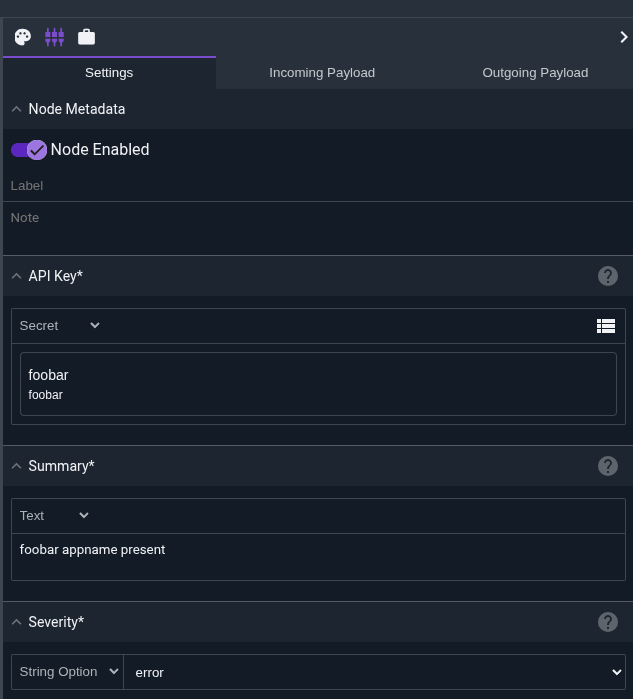
This example runs a query to detect an unauthorized Appname in the gravwell tag. If results exist, it creates a PagerDuty incident with a “high” severity.

The PagerDuty node is configured with:
API Key: A reference to a secret containing the PagerDuty integration keySummary: “foobar appname present”Severity: “high”Source: A reference from the flow nameComponent: Is not configured and will be left blank in the incidentClass: Is not configured and will be left blank in the incidentGroup: Is not configured and will be left blank in the incidentCustom: Additional fields likesearch.Countandsearch.StartLinks: A link back to the Gravwell flowTimeout: A time out of 10 seconds, each pagerduty request attempt will wait up to 10 seconds for a response before failing and retrying.Retry Count: 5, if the initial request fails, the node will retry up to 5 times with exponential backoff.
The output in PagerDuty will display the incident with all configured details and the flow payload will contain the deduplication key for future reference.

PagerDuty API Keys#
The PagerDuty Create Incident node requires a valid integration key (also called a routing key) to send incidents to PagerDuty. This key is specific to a PagerDuty service and can be obtained from the service’s integration settings.
To create an integration key:
Navigate to Services in your PagerDuty account
Select the service you want to integrate with
Go to the Integrations tab
Add a new integration using the Events API V2 integration type
Copy the Integration Key (routing key)
Warning
Pagerduty API keys can create incidents and get people out of bed in the middle of the night. Be sure to store them as secrets and restrict access as much as possible.
Note
This node is designed to be highly resilient and prioritize getting alerts out. Even if optional fields fail to populate, the node will attempt to create the incident with whatever information is available. Check the flow logs for any warnings about failed optional field processing.
Note
The deduplication key returned by PagerDuty can be used to send subsequent events that update or resolve the same incident, preventing duplicate incidents from being created for the same issue.
PagerDuty API Size Limits#
Pagerduty has strict limits on the overall size of an API request as well as the size of specific fields in an event. The node will attempt to truncate fields that exceed PagerDuty limits, but if the overall payload exceeds limits such that the request will fail, the node will begin trimming potentially un-needed fields to try and get the request out. If a field is truncated or trimmed, the log for the node will mention it in the debug log.
