
Okta Ingester#
The Okta ingester polls the Okta System Log and Users APIs.
System logs (
oktatag) all Okta system events: logins, MFA challenges, policy evaluations, admin actions, application access, and more. Events are ingested in order with timestamps preserved from the original records.User records (
okta-userstag) snapshots of user profile changes, polled every 10 minutes. Useful for correlating identities against activity in the system log.
The tags okta and okta-users are fixed and expected by the Gravwell Okta kit; they cannot be changed.
This ingester runs as a plugin inside the Gravwell Hosted Runner. Multiple Okta stanzas can coexist alongside other Hosted Runner plugins in a single configuration file.
Installation#
To install the Debian package, make sure the Gravwell Debian repository is configured as described in the quickstart. Then run the following command as root:
apt update && apt install gravwell-hosted-runner
To install the Redhat package, make sure the Gravwell Redhat repository is configured as described in the quickstart. Then run the following command as root:
yum install gravwell-hosted-runner
To install via the standalone shell installer, download the installer from the downloads page, then run the following command as root, replacing X.X.X with the appropriate version:
bash gravwell_hosted_runner_installer_X.X.X.sh
You may be prompted for additional configuration during the installation.
The Docker image is available on Dockerhub.
If you already have the hosted runner installed, you can modify the config.
Configuration#
To configure the ingester you will need the following from Okta:
Domain: Your Okta account domain, e.g.
myorg.okta.comAPI Token: A token generated from the Okta Admin Console. This should be created for a dedicated Read Only Admin service account, not a token from a user.
See the Okta documentation for instructions on generating an API token.
Creating an Okta Token#
Start by creating a dedicated Okta Service Account for logging purposes (something like “Okta Log User”). This user should be assigned to the “Read Only Admin” role.
Attention
Do not use a token with write permissions to your Okta instance to the ingester. This gives significantly more access than is needed for monitoring.
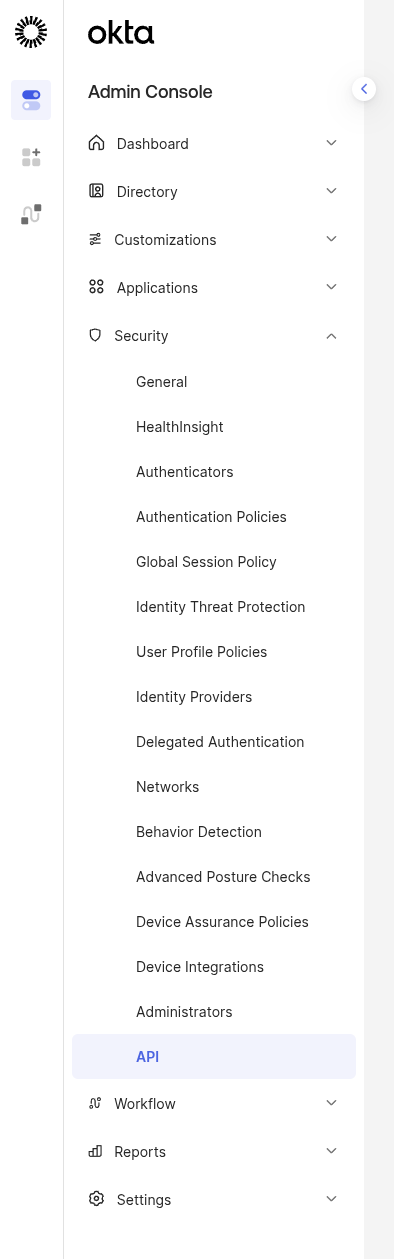
You can create an API token in the Okta Admin Console > Security > Api section.
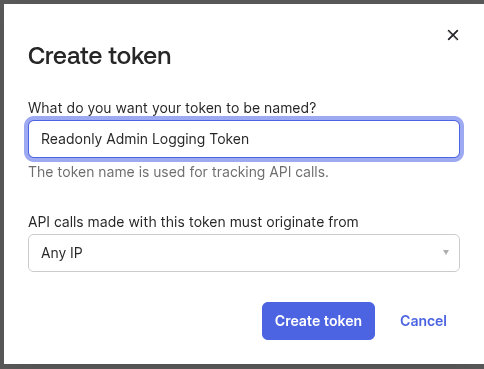
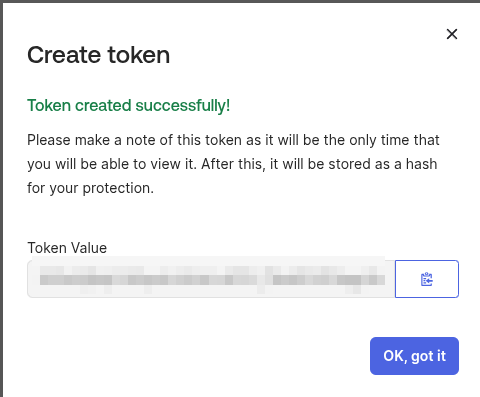
Once created the token value will be used in the Token config parameter. Make sure to copy it.
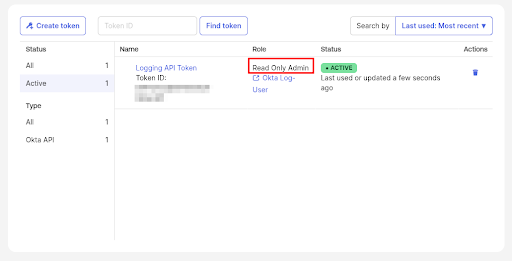
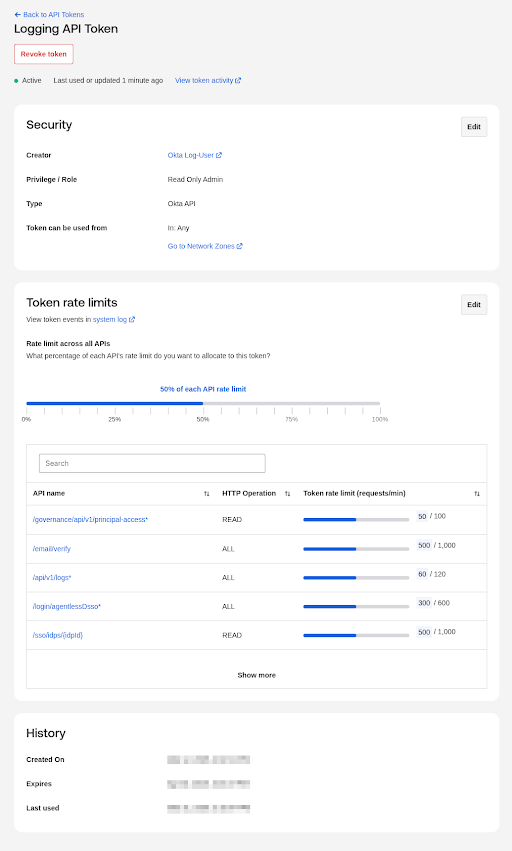
Once create you should see this token in your list and should double-check the role is “Read Only Admin”, and that it is attached to a dedicated service account.
Token Rate Limits#
Okta is extremely sensitive to rate limits so double-check your token rate limits align to the Request-Per-Minute Config Parameter. The Ingester primarily hits the /api/v1/logs endpoint.
Okta Stanza Parameters#
The Okta ingester is configured via [Okta "name"] stanzas in the Hosted Runner configuration file, typically /opt/gravwell/etc/hosted_runner.conf. The [Global] and [State] blocks common to all Hosted Runner plugins are described in Hosted Runner Configuration.
Config Parameter |
Type |
Required |
Default |
Description |
|---|---|---|---|---|
Ingester-UUID |
UUID |
yes |
A unique UUID for this ingester instance. Used for state tracking. |
|
Domain |
string |
yes |
Your Okta account domain. Must end in |
|
Token |
string |
yes |
Okta SSWS API token from the Okta Admin Console. |
|
Request-Batch-Size |
integer |
no |
100 |
Number of log entries to request per API call. |
Request-Per-Minute |
integer |
no |
60 |
Maximum number of API requests per minute. |
Request-Burst |
integer |
no |
10 |
Burst capacity for the request rate limiter. |
Example Configuration#
[Okta "myorg"]
    Ingester-UUID="99c00000-0000-0000-0000-000000000000"
    Domain="myorg.okta.com"
    Token="your-okta-api-token"
With optional rate limiting tuned down for lower-tier Okta plans:
[Okta "myorg"]
    Ingester-UUID="99c00000-0000-0000-0000-000000000000"
    Domain="myorg.okta.com"
    Token="your-okta-api-token"
    Request-Per-Minute=10
    Request-Burst=5
    Request-Batch-Size=100