
Pi-hole#
Integration Details |
|
Kit |
Pi-hole Configuration#
An API key is required use the following steps to get the key:
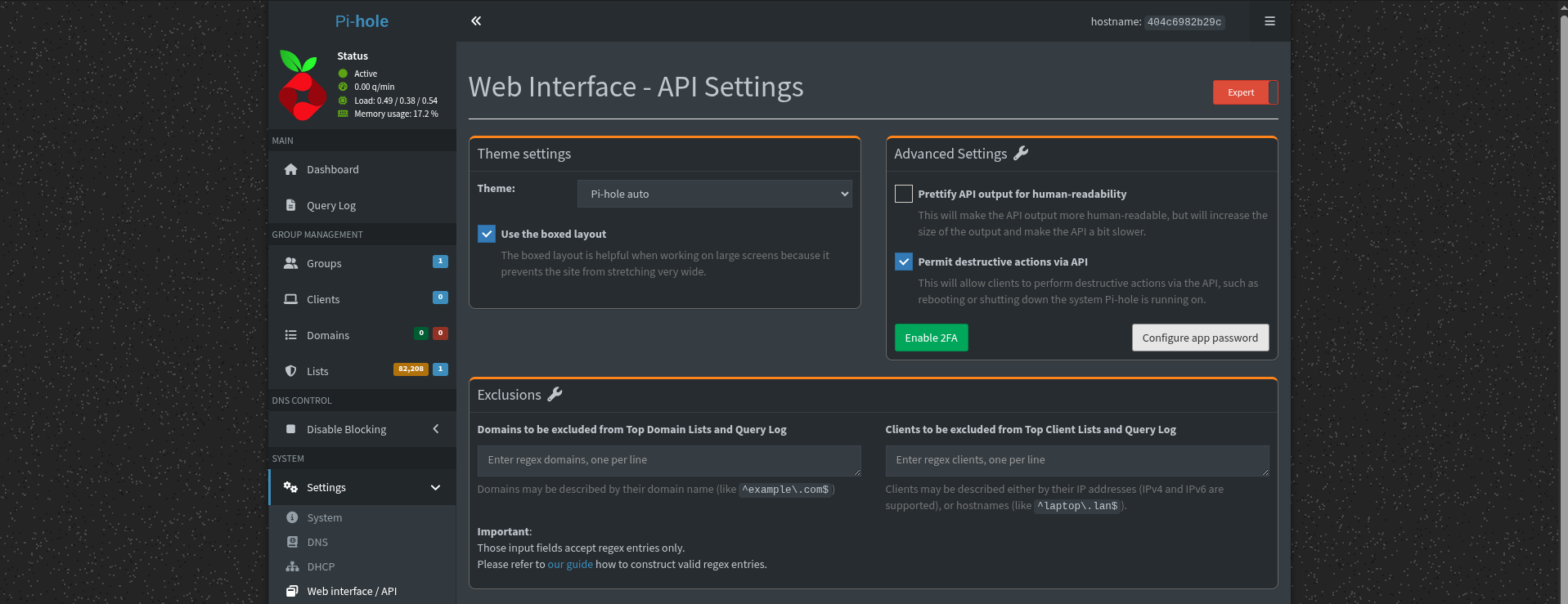
Pi-hole v6.0+:
Log into your Admin Dashboard
Go to
Settings > API/Web InterfacetabSwitch the view from Basic to Export using the toggle at the top right
Click Configure app password
Copy the generated password
Pi-hole v5.x and earlier:
Log into your Admin Dashboard
Go to
Settings > API/Web InterfacetabClick the
Show APItoken buttonConfirmation box will appear; click Yes, show API token and copy the raw text string
Gravwell Configuration#
Gravwell uses its scripting interface (in the Pi-hole Kit) to request data from the Pi-hole API.
Set the
$PIHOLE_IPmacro to the IP Address of your pihole instanceChange the
$PIHOLE_PORTmacro to the port of your pihole instance (Usually 80)Get the API key from your pihole instance. Go to
Settings > APIand then theShow APItoken buttonSet the
$PIHOLE_APIKEYmacro to the token from the previous stepSet the
PIHOLE_TAGmacro to the desired tag name. The default ispihole-queriesIf you used a tag name other than the default you will need to update the extractor to your new tag name
Go to scripts and enable the
PiHole Scriptto run every 5 minutes with a cron schedule of*/5 * * * *
Gravwell Storage Well Configuration#
Setup the well configuration in your Gravwell indexers.
Sample well config:
Create or edit: /opt/gravwell/etc/gravwell.conf.d/pihole.conf
[Storage-Well "pihole"]
    Location=/opt/gravwell/storage/pihole
    Tags=pihole*